AI desktop translation, lightning fast. A single global shortcut unlocks the entire translation capability.
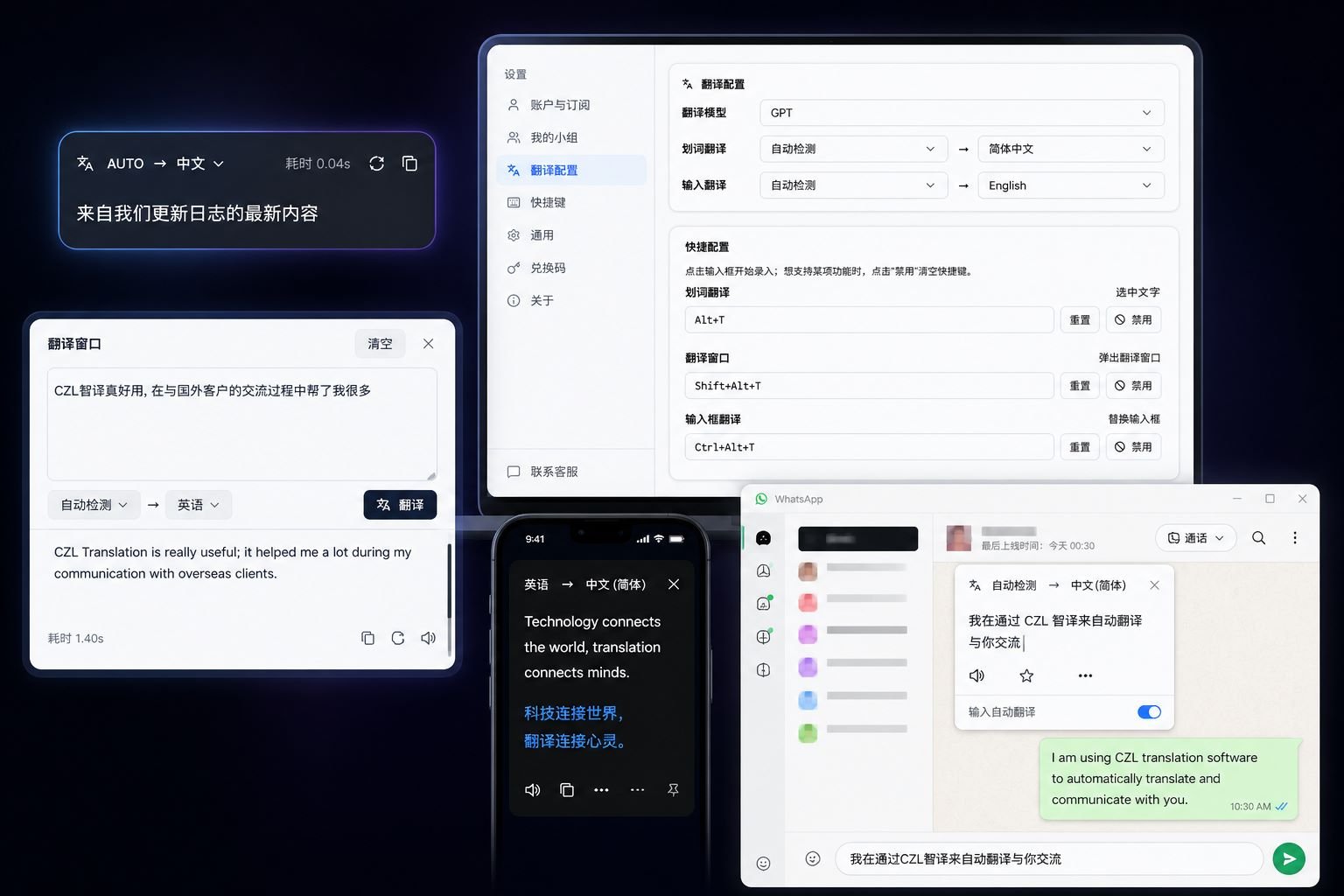
If you spend your days constantly switching between English academic papers, foreign trade emails, source code comments, and chat windows; if you're tired of opening a browser, finding a tab, pasting, waiting for results, and then switching back—TransAI is designed for this kind of workflow.
It resides permanently in the system tray, with three independent global shortcuts covering three translation methods: select to translate, translate from a pop-up window, and replace Chinese with English on the spot. It integrates with multiple mainstream AI models in the background, automatically switching to the primary model in case of malfunction, ensuring stable and reliable translation. It supports both Windows 10+ and macOS 12+ Apple Silicon platforms, eliminating the need for browsers, web page translation plugins, and any steps requiring "opening ChatGPT first."
The problem it solves
Desktop translation has been a repetitive experience for the past decade: copy → switch windows → paste → wait for results → switch back. The AI era has arrived, but most AI translations still operate on a "webpage + input box" model.
TransAI's judgment is:AI translation should be integrated into operating system-level keyboard shortcuts, rather than requiring a separate tab..
Thus, three core keyboard shortcuts were created:
| shortcut key | Behavior | Applicable Scenarios |
|---|---|---|
| Word-by-word translation | Selecting text will bring up a small pop-up window displaying the translation. | Reading papers and English articles |
| Translation window | A separate translation input box will pop up, allowing you to paste long texts. | Translate long passages and use them repeatedly. |
| Input box translation | Move the Chinese text at the current cursor positionLocal replacementFor English | Write emails, chat, write code comments |
Each keyboard shortcut can be configured or disabled individually. A red warning will appear if there is a conflict.
Three typical scenarios
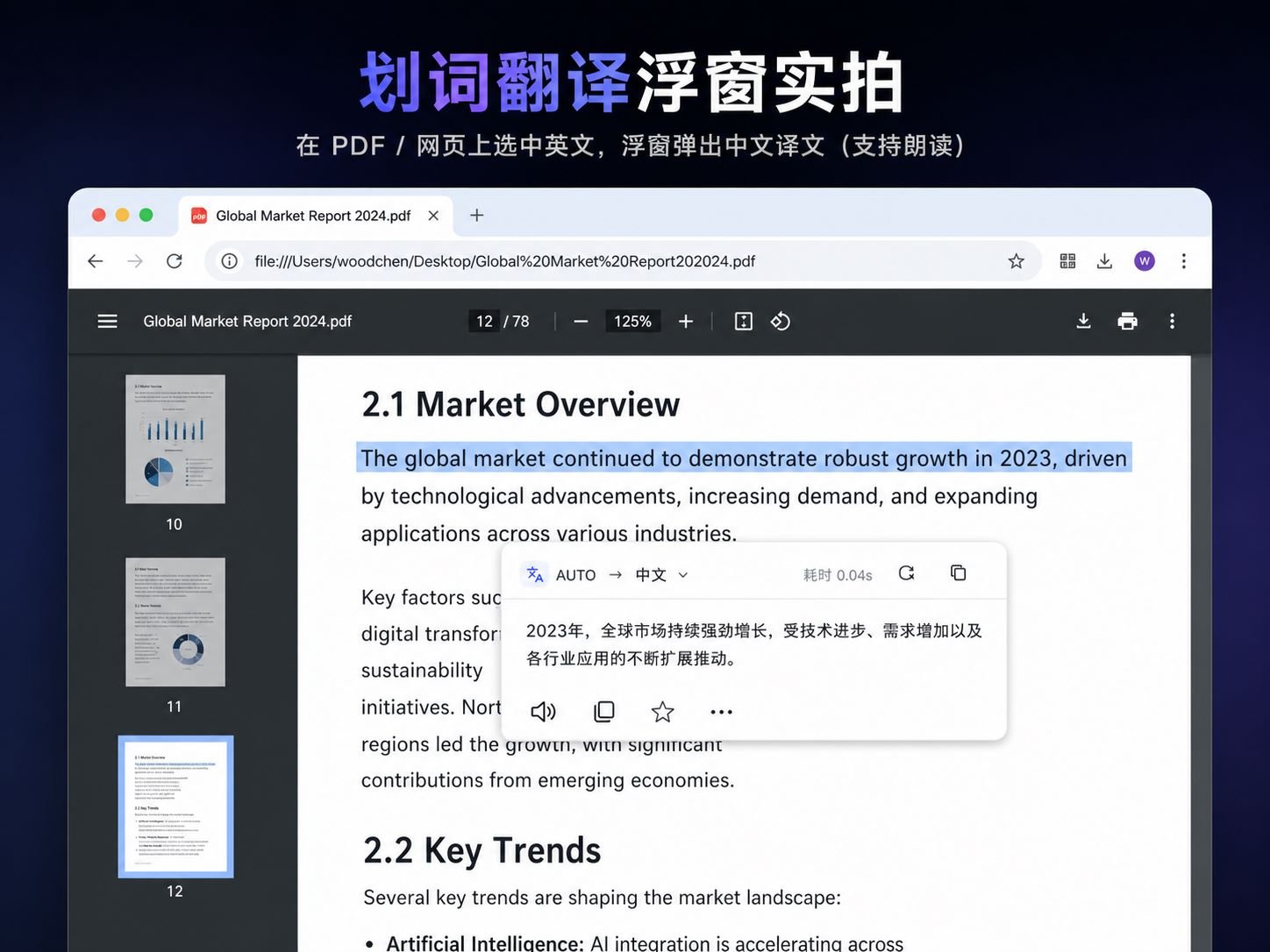
1. Read English academic papers/technical documents
A word highlighting pop-up appears near the selected area without interrupting the reading flow. The translation supports TTS reading with authentic pronunciation, and with 500 local translation history entries, the same content is returned instantly.
2. Foreign trade emails/cross-border chat
Type your Chinese characters in any input box in Outlook, Gmail Web, WeChat Work, or Telegram, then press Enter. Alt+Ctrl+TTransAI reads the current selection or input content, calls AI to translate it, and then writes it back to the original location using the clipboard—without moving the cursor or switching windows.

Industry feedback: Email response speed increased by 3 times.
3. Team collaboration (Pro/Max group sharing)
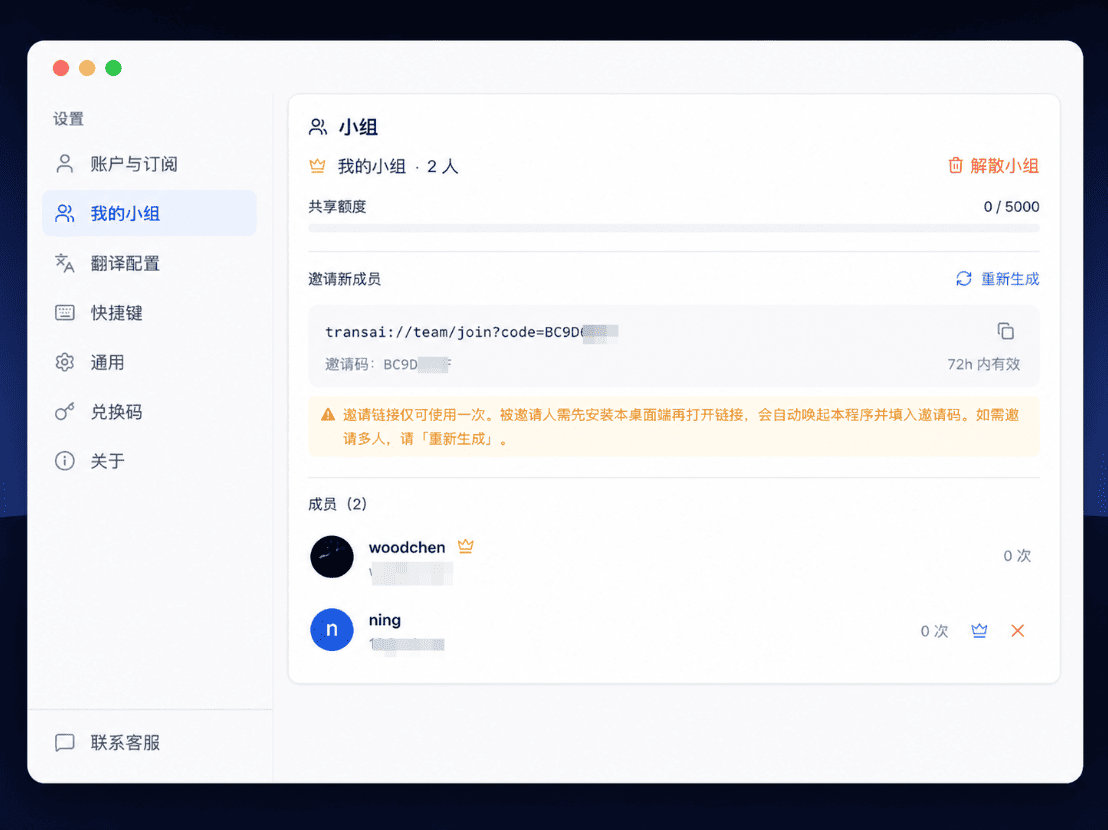
Starting with Pro, groups can be created (up to 5 people), and Max supports 10 people. Group members' translations will consume the group leader's daily quota first. The group leader can generate an invitation link by clicking "My Groups" in the client and sending it to colleagues. Clicking the link will automatically launch the client, where the invitation code will be pre-filled; simply confirm to join.
Invitation LinkSingle useThis link expires immediately after use. It needs to be regenerated when multiple people need to be invited. This is to prevent unauthorized individuals from infiltrating the link after it has been forwarded.
Why won't I uninstall it after using it for a year?
These details are rarely mentioned on the product page, but they determine whether you will switch back to another tool after six months.
Translation never goes in circles.”It integrates multiple mainstream AI models. If the primary model malfunctions, experiences bandwidth limitations, or becomes slow, it will automatically switch to a backup model to continue translating—all you see is "pressing a shortcut key and the translation appears."
Authentic pronunciationA speaker button next to the translation allows you to listen to the original audio, switching between male and female voices, making it a helpful tool for practicing listening and speaking skills.
Translation history is only on your computerThe last 500 messages are saved locally; identical content is replied to instantly without consuming the quota. The server only knows how many characters you used, not what content you viewed.
One account can be used on 3 computers at will.You can log in from home, the office, and your laptop. When you switch computers, you can remotely disable the old computer in "My Devices" to prevent strangers from taking over your account.
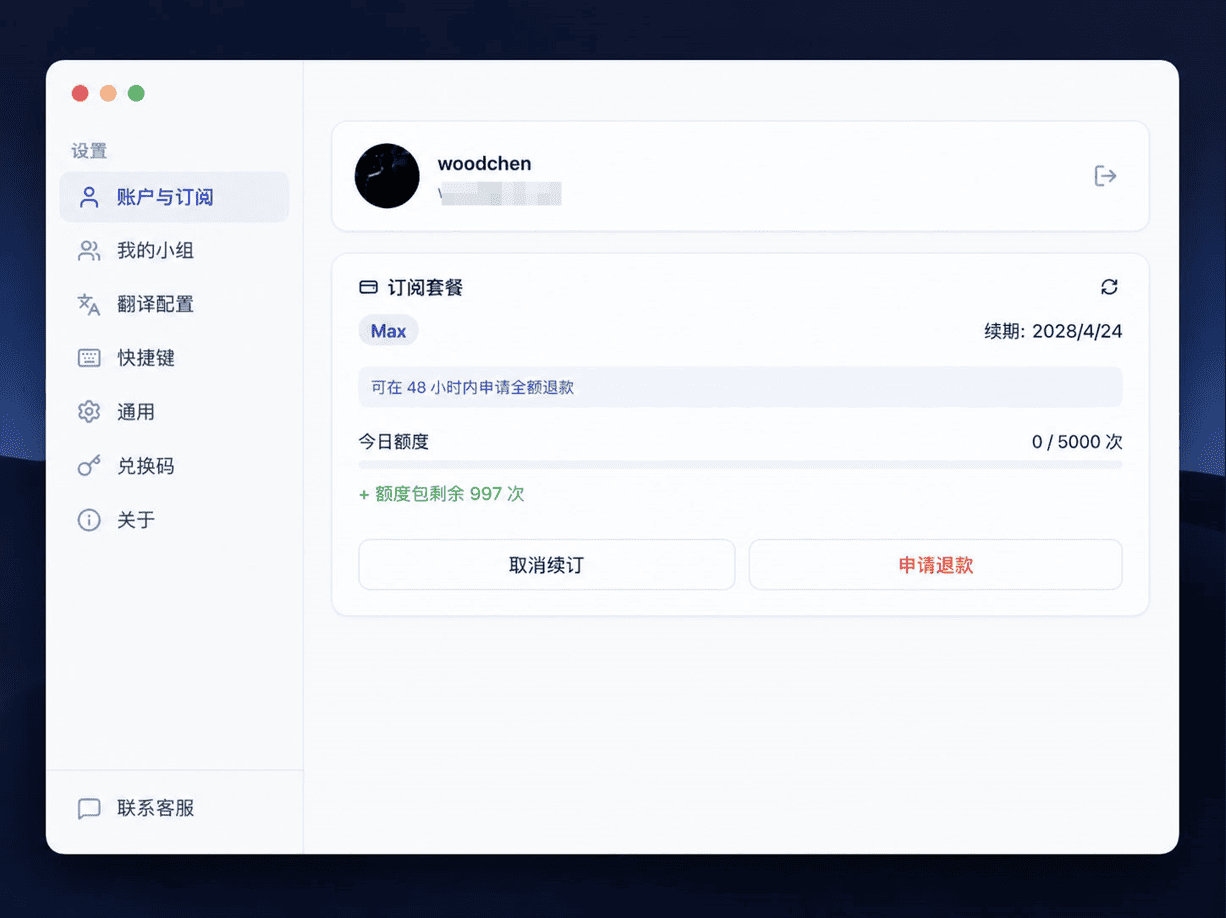
Upgrades and refunds are straightforward.Upgrade from Pro to Max without waiting for the expiration date; the price difference will be automatically calculated based on the remaining days. If you are not satisfied within 48 hours, you can get a full refund with one click, and your plan will immediately revert to the free version.
Always the latest versionThe new version will be automatically prompted and downloaded in the client; you don't need to search for the installation package on the website yourself.
price
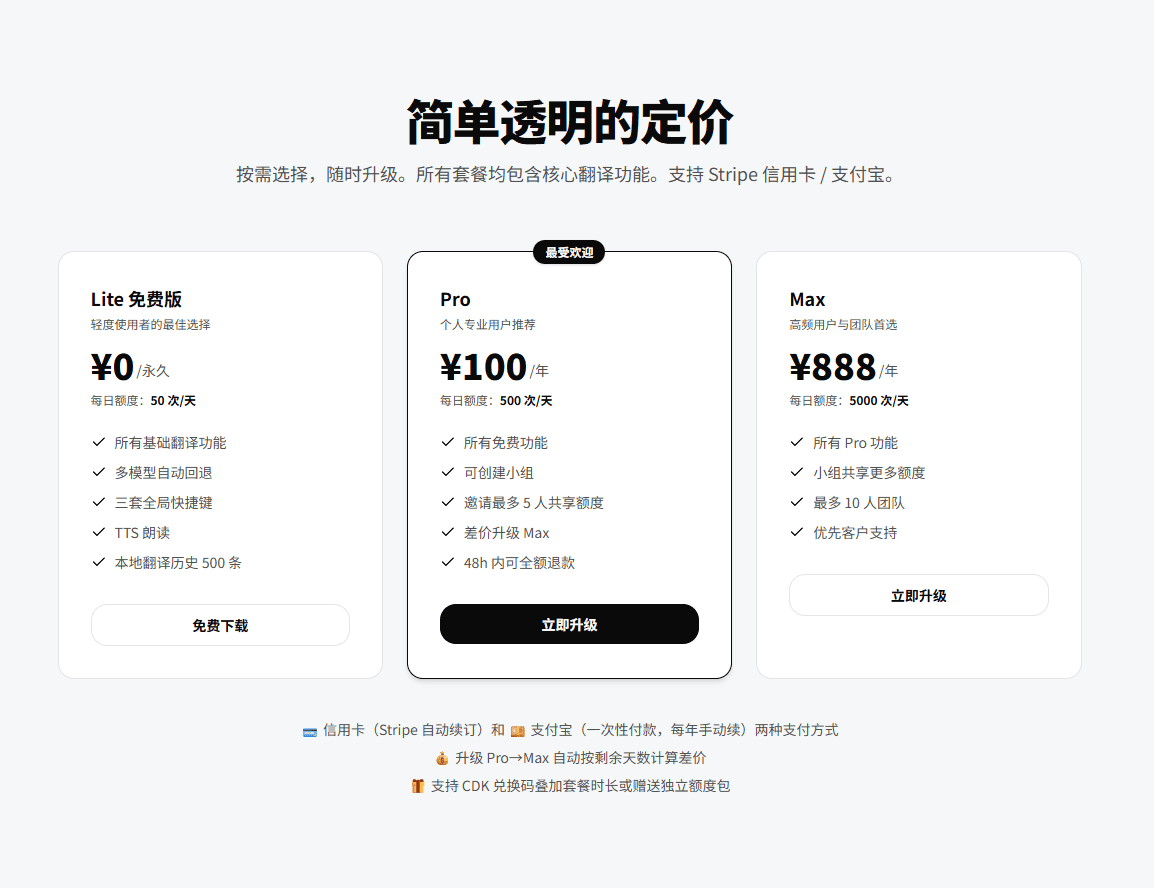
One translation = ⌈Number of source text characters ÷ 1000⌉. That is, 1000 characters or less counts as one translation. In Pro, 500 translations/day ≈ 500,000 characters/day.
Payment methodsCredit card (automatic renewal) or Alipay (one-time payment, manual renewal annually).
Flexible upgradesUpgrading from Pro to Max automatically calculates the price difference based on the remaining days, without needing to wait for the expiration date.
48-hour no-questions-asked refundFull refund available within 48 hours of your first payment, with an immediate downgrade to Lite plan. Refund terms are transparent, and customer service handles your request directly. Credit card refunds arrive within 5-10 business days, and Alipay refunds within 24-48 hours.
CDK redemptionSupports combining redemption codes with package durations or offering a separate credit limit. Credit limits are used first and automatically extended upon expiration.
Three steps to begin

- Download and installDouble-click the installation package, and the application will automatically reside in the system tray.
- Login accountUse CZL Connect for one-click login, no additional registration required.
- Start translatingPress the global shortcut key, select the text or paste the content, and get the translation result immediately.
From downloading to the first translation, it usually takes no more than a minute.
Download now
- Windows 10+:Download Windows version
- macOS 12+ Apple Silicon:Download macOS version
macOS only supports Apple Silicon (M1 / M2 / M3 / M4) and no longer offers an Intel x86_64 version.
Full features, pricing, and FAQ:www.czl.net/cn/transai